
Kicking off a website redesign or building one from scratch can feel like a total free-for-all. I’ve seen it countless times: projects get messy, deadlines are missed, and budgets spiral out of control. Website development management is what separates a chaotic, stressful build from a smooth, successful launch. It’s the game plan that keeps everything on track.
Your Blueprint for a Successful Website
Think of your website as more than just a digital storefront—it’s a core part of your business operations. But without a clear management framework, even the most exciting projects can get bogged down by scope creep and endless delays. This guide is designed to give you that exact framework, a proven process that takes you from a simple idea to a high-performing website that grows with your business.
Having a structured approach aligns everyone involved, from your marketing team to the developers. This clarity is essential, especially now. The web development market is exploding, expected to reach $82.4 billion by 2026 and possibly over $165 billion by 2035. With that much growth comes a lot of noise and competition. A solid plan is what will make your website stand out.
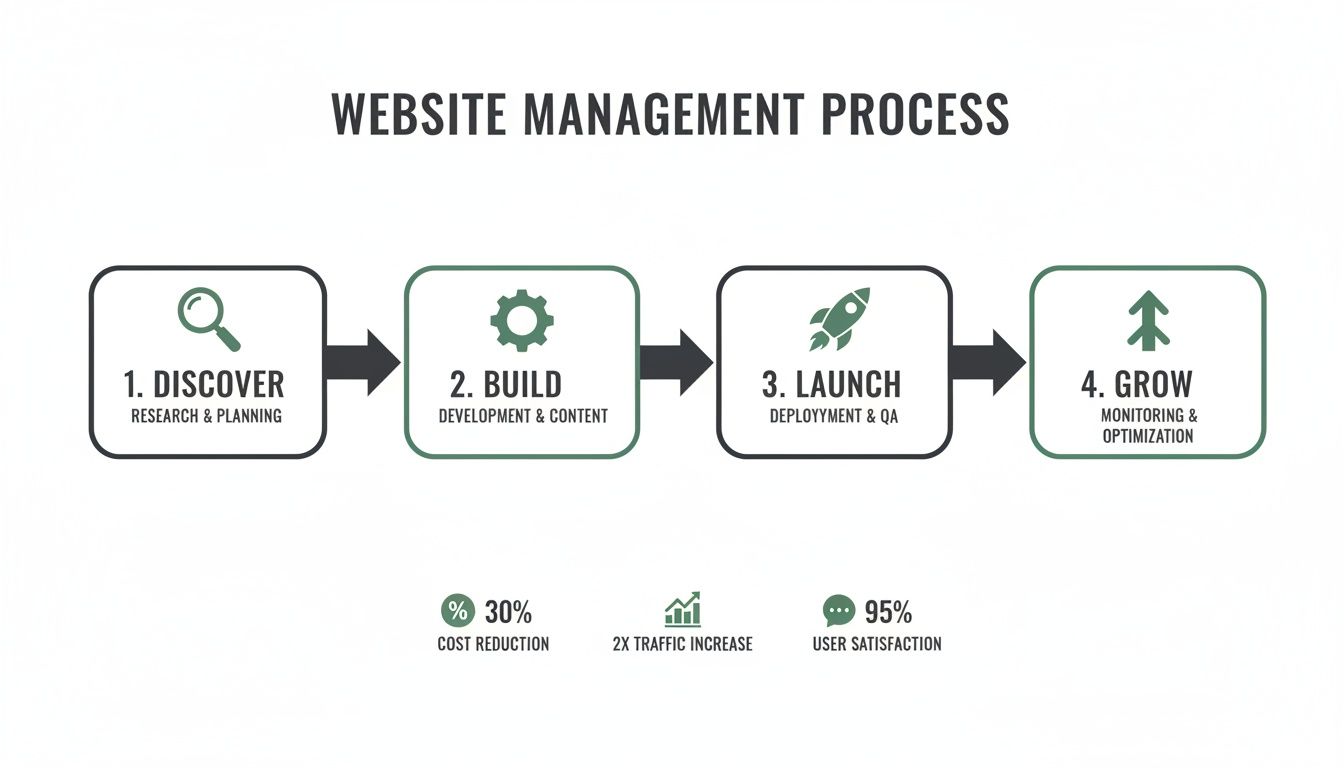
To make this complex process easier to handle, I always break it down into four distinct phases. This model helps organize tasks, manage resources, and gives everyone a clear view of our progress.
Let's look at what each phase entails. This table summarizes the core stages, their main objective, and what you should expect to have in hand at the end of each one.
The Four Phases of Website Development Management
| Phase | Primary Goal | Key Deliverable |
|---|---|---|
| Discover | Define project goals, audience, and technical requirements. | A detailed project brief or scope of work. |
| Build | Translate the plan into a functional website. | A fully developed website on a staging server. |
| Launch | Deploy the website live smoothly and securely. | A live, publicly accessible website. |
| Grow | Optimize and improve the website based on data. | Ongoing performance reports and an optimization roadmap. |
Thinking about your project in these four stages turns an overwhelming task into a manageable series of steps. It creates a roadmap that reduces surprises and ensures you’re getting the most out of your investment.
This flowchart maps out the entire journey, from initial discovery all the way to post-launch growth and optimization.
A well-managed website project is won or lost before a single line of code is written. The discovery phase sets the trajectory for everything that follows, ensuring you're building the right solution for the right problem.
Getting through these stages successfully means having the right expertise, whether you build an in-house team or hire an agency. If you’re looking for a partner, having a firm grasp of this process will be your biggest advantage. For more on this, our guide on choosing the right web design company for you has some great tips.
In the next sections, we'll get into the nitty-gritty of each phase, complete with actionable steps and checklists to help you manage your next web project like a pro.
Discovery and Strategy: The Foundation of a Successful Website
I’ve seen more website projects go off the rails because of a rushed beginning than for any other reason. Before a single line of code is written or a pixel is pushed, the most important work happens right here, in the discovery phase. This is where you get brutally honest about what you're trying to achieve.
Rushing this stage is the number one cause of scope creep, budget overruns, and launching a site that just doesn't perform. We're moving beyond the vague idea of "we need a new website" and defining exactly what that site must accomplish to move the needle for your business.
Getting Real with Stakeholder Interviews
You can't build a great business tool without first understanding the business. That means talking to the people on the front lines. Your first job is to identify and interview everyone who has a stake in the website’s success—marketing leaders, sales managers, customer service reps, and the C-suite. Each one has a unique perspective you can't afford to miss.
These aren’t just casual chats. You're digging for pain points and opportunities. Get past the surface-level requests by asking targeted questions:
- What’s the single most important thing you want a visitor to do on this new site?
- What questions from customers are you tired of answering? What information is impossible for them to find right now?
- How does the sales team actually use the website? What’s missing that would make their job easier?
- A year from now, if this new website is a massive success, what does that look like for your department specifically?
This is how you translate abstract goals into tangible features. For example, a sales team’s wish for "better leads" might turn into a concrete requirement for an interactive pricing calculator and hard-to-miss "Request a Quote" buttons on every service page.
A project's success is directly proportional to the quality of questions asked during discovery. The more you uncover now, the fewer expensive surprises you'll encounter later.
Sizing Up the Competition
Once you have a handle on your internal needs, it’s time to look outward. A competitive analysis isn't about copycatting; it's about spotting gaps in the market that you can drive a truck through. Pick three to five of your direct and indirect competitors and put their websites under the microscope.
Look for patterns. How do they structure their navigation? What's their core message? Are their calls to action compelling or confusing? Maybe they all use the same generic stock photos, giving you an opening to build trust with authentic team pictures. Your goal is a simple list of "wins" (what they do well) and "opportunities" (what they do poorly or ignore completely).
Setting Objectives with Measurable KPIs
All this research is useless if it doesn't lead to a clear plan. It’s time to connect every goal to a measurable Key Performance Indicator (KPI). This is the step that separates a pretty online brochure from a genuine business asset. It forces you to justify every decision.
| Business Goal | Website Feature/Functionality | Primary KPI |
|---|---|---|
| Increase Qualified Leads by 25% | Multi-step contact form with service selectors | Number of qualified form submissions per month |
| Reduce Customer Support Calls | Comprehensive, searchable FAQ/Knowledge Base | Reduction in support tickets related to common questions |
| Boost Local Service Bookings | Geotargeted landing pages with online scheduling | Number of appointments booked through the website |
This framework makes your decisions purposeful. Let’s say you’re a home service provider in San Diego. You’d map out the entire journey for a local homeowner searching for your service. That journey dictates your site’s navigation, what content you need, and where to place trust-builders like local reviews and certifications.
This all culminates in the Scope of Work (SOW). Think of this document as your project's constitution. It details every feature, function, deliverable, and deadline everyone has agreed on. A rock-solid SOW is your single best defense against the dreaded "scope creep" that sinks so many web projects, making sure what you build is exactly what your business needs.
Assembling Your Team and Tech Stack
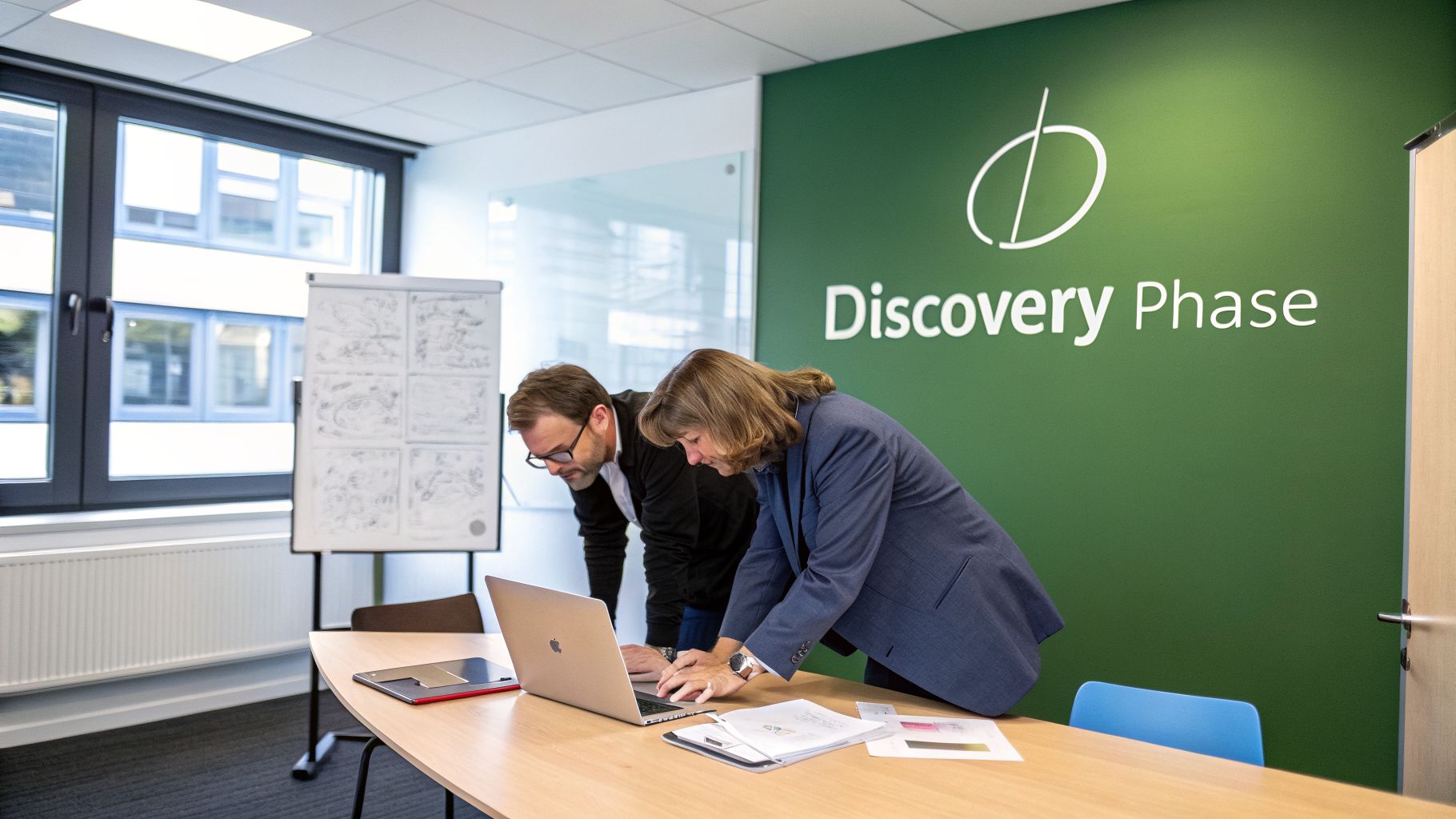
Once your strategy is nailed down and you have a clear scope of work, it's time to assemble the crew. Getting the right people and the right tools in place is where the rubber meets the road in website development management. I've seen more projects go off the rails from a poor team fit or the wrong tech choice than from almost any other mistake.
The Key Players in Your Web Project
Even for what seems like a simple website, you need a few distinct skill sets to get it done right. On larger projects, these are all separate people. For most small businesses, one talented person or a small agency partner will cover several of these roles.
Project Manager: Think of them as the project's director. They’re the one who keeps an eye on the budget, manages the timeline, and ensures everyone is communicating effectively. They’re your main point of contact, translating your vision into tasks for the technical team.
UX/UI Designer: This is often a two-part role. The User Experience (UX) side is about mapping out the user’s journey and making sure the site is logical and easy to navigate. The User Interface (UI) side is about bringing that logic to life visually—choosing the colors, fonts, and button styles that make up the site's personality.
Web Developer: This is your builder. They take the designs and the functional plans and turn them into a real, working website. They write the code, set up the content management system, and make sure everything functions as it should.
SEO Specialist: This person’s job is to make sure Google can find and understand your website from day one. They have a say in the site's structure, the content plan, and a whole host of technical details that are crucial for ranking well.
For many small and mid-sized businesses, the idea of hiring four different experts is overwhelming. That's why finding a well-rounded agency or a versatile freelancer is often the most practical route. You get the benefit of all these skills under one roof, which usually leads to a much smoother process.
Choosing Your Content Management System
The technology your site is built on has huge long-term implications. This is your Content Management System (CMS), and it's the engine that runs everything. It determines how easily your team can update content, add new features, and optimize for search engines.
While there are many options out there, WordPress is still the king of the hill for a reason. Its dominance is staggering—WordPress powers an incredible 43.6% of all websites on the internet. That kind of market share speaks volumes about its flexibility. With the global CMS market projected to hit over $54 billion in 2025, much of that growth is driven by platforms like WordPress that can scale with a business. You can dive deeper into these development statistics on Esparkinfo.
We choose WordPress for our clients because it strikes the perfect balance between user-friendliness for marketing teams and the technical depth needed for robust SEO and custom development. It grows with your business, not against it.
The real beauty of WordPress is its scalability. You can launch with a simple five-page brochure site and, down the road, bolt on a full e-commerce store, a client portal, or a complex booking system without having to start over from scratch.
Building SEO into the Foundation
One of the most expensive mistakes you can make is treating SEO as an add-on. Trying to fix SEO after a site is built is like trying to add a foundation to a house that's already finished—it’s clunky, expensive, and never as solid as building it right from the start.
Great website development management bakes technical SEO into the process from the very beginning. This foundational work gets your site ready for search engine success before it even goes live.
Here’s what you absolutely must get right during the development phase:
- Logical Site Architecture: Your site map should be clean and hierarchical, making sure your most important pages are only a click or two away from the homepage. This helps both users and search engine crawlers find what they need, fast.
- SEO-Friendly URL Structure: URLs should be clean and descriptive. A URL like
yourdomain.com/services/local-seotells you exactly what the page is about, unlike a generic one likeyourdomain.com/page-id=123. - Mobile-First Design: With more than half of all web traffic now on mobile, your site has to look and work perfectly on a small screen. This isn’t just about making a desktop design shrink; it's about designing for the mobile experience first and then adapting for larger screens.
- Site Speed Foundations: A slow website kills conversions and hurts your search rankings. From the get-go, your developer should be optimizing images, writing efficient code, and helping you select a high-quality web host.
By tackling these technical SEO elements during the build, you avoid frustrating and costly fixes later. You’ll launch a site that isn't just pretty, but is primed to be discovered by the right people from day one.
Managing the Build from Design to QA

This is where the rubber meets the road. All that planning and discovery work is about to become a tangible, functional website. Getting from a static design file to a working product demands careful oversight, clear communication, and an almost obsessive focus on quality.
It all kicks off with the design handoff. The design team passes over their final, high-fidelity mockups, which serve as the architectural blueprints for your developers. These aren't just pretty pictures—they spell out the exact layout, typography, colors, and spacing for every single element on the site.
From Static Mockups to a Live Staging Site
With approved designs in hand, the development team gets to work. Their first move is to set up a staging environment. Think of this as a private, password-protected clone of your future website. It's a safe sandbox where code is written, features are built, and content gets loaded, all without touching your current live site.
Your job as the project lead is to make this handoff as smooth as possible. That means giving the developers everything they need right from the start.
- High-fidelity mockups for every key page and screen size (desktop, tablet, and mobile).
- A style guide that details fonts, colors, button styles, and other interface components.
- All final website copy, neatly organized in a shared document.
- Image and video assets, properly named and optimized for fast loading times.
Honestly, waiting for content is one of the most common bottlenecks in any web project. Having all your assets ready before development kicks off is one of the best ways to keep everything on schedule.
Fostering an Agile and Collaborative Workflow
You don't need a formal, certified process to be agile. For most small business projects, it's about adopting a few simple, powerful habits that keep the project moving and transparent.
We typically work in one or two-week "sprints." At the beginning of each sprint, we’ll agree on a specific set of tasks—like building the homepage and main navigation. At the end, we review what’s been done. This iterative cycle helps catch issues early and allows everyone to make adjustments on the fly, preventing big, costly surprises down the road.
I’ve found that quick, daily or bi-weekly check-ins are invaluable. Even a 15-minute call can clear up roadblocks and make sure the designer, developer, and client are all on the same page.
This is also where you refine your feedback process. Instead of sending a long email with vague notes like "make the logo bigger," use a visual feedback tool like Markup.io. These tools let you click directly on the staging site and leave specific comments, which is far more precise and helpful for a developer.
The Critical Role of Quality Assurance
Once the website is considered "feature complete" on the staging server, it’s time for Quality Assurance (QA). This is your final line of defense before the site goes public. Rushing or, even worse, skipping QA is a surefire way to launch a site with broken links, buggy forms, and a frustrating user experience. It's a real problem—an alarming 73% of users report leaving a website because of a bad experience, and thorough QA is how you prevent that.
Good QA isn't about randomly clicking around. It's a methodical process where you systematically test every single component of the site to ensure it works as intended.
The Ultimate QA Testing Checklist
To make sure nothing slips through the cracks, we break our testing into a few key areas:
1. Functional Testing:
- Do all navigation links and buttons work and point to the right place?
- Can you submit every form? Do they send a notification and show the correct thank-you message?
- Test all interactive elements like image sliders, accordions, and pop-ups.
2. Cross-Browser and Device Testing:
- Check the site on major browsers (Chrome, Firefox, Safari, and Edge) for any visual bugs.
- Test everything on real mobile devices (iOS and Android) and tablets. Pay close attention to touch targets and font readability.
3. Content and Visual Review:
- Proofread every single page for typos and grammatical mistakes.
- Make sure all images load correctly and aren't blurry or stretched.
- Verify that headings, lists, and quotes are all formatted correctly.
4. Performance Testing:
- Run the staging site through a tool like Google PageSpeed Insights. You're looking for anything that slows the site down, like large images or render-blocking code.
- A fast site is non-negotiable for both users and SEO. For those on WordPress, you can improve your website speed in our dedicated guide.
By following a structured build and QA process, you'll turn a collection of design files into a polished, high-performing website that’s truly ready for launch.
From Launch Day to Long-Term Growth

It’s easy to think of launch day as the finish line. After all the planning, design, and development, your new site is finally live. It's a huge milestone, for sure, but it’s really just the starting line. Now the real work begins: turning that beautiful new website into an engine that actually grows your business.
Proper website development management doesn't stop when you flip the switch. In fact, what you do in the hours before and the weeks after launch will determine if your investment truly pays off.
The Final 48-Hour Countdown
The last couple of days before going live should feel less like a frantic coding session and more like a pilot's pre-flight inspection. This is your chance to verify everything, ensuring a smooth transition for both users and search engines. Trust me, overlooking a small detail now can create major headaches later.
To keep things on track, use a simple checklist to run through all the mission-critical items one last time.
Pre-Launch Final Checks
This table isn't exhaustive, but it covers the absolute must-haves that need a final green light in the 48 hours before your big debut.
| Category | Task | Status |
|---|---|---|
| Redirects | Implement a comprehensive 301 redirect map from old URLs to new ones. | ☐ Complete |
| Analytics | Confirm Google Analytics and other tracking codes are installed and firing correctly. | ☐ Complete |
| Backups | Perform a full backup of both the new site files and the database. | ☐ Complete |
| SEO | Verify the live sitemap is submitted to Google Search Console and Bing Webmaster Tools. | ☐ Complete |
| Forms | Test every single web form one last time on the live server. | ☐ Complete |
| Security | Check that your SSL certificate is correctly installed and forcing HTTPS. | ☐ Complete |
Don’t just tick these boxes; give them your full attention. If there's one thing you absolutely cannot skip, it's the 301 redirects. This is how you tell Google that your old pages have moved, ensuring you don't lose the valuable search ranking authority you’ve worked so hard to build.
Your First 90 Days: Monitor, Learn, and Adapt
With the site live, your job shifts from builder to observer. The first 90 days are all about establishing a performance baseline. You're watching, listening, and learning how real people interact with your new site in the wild.
Don't rush to make major changes right away. The initial data you collect is invaluable because it shows you what "normal" looks like. It’s the foundation for every optimization you'll make down the road.
Your goal in the first month isn't to fix things—it's to understand them. Let the data roll in before you start tweaking. Resist the urge to react to every little dip or spike.
To get a clear picture, track a handful of key metrics every week. Focus on:
- Overall Traffic: Are visitor numbers where you expect? What channels are bringing them in (organic search, social media, direct visits)?
- Top Pages: Which pages are getting the most traffic? Are your most important service or product pages getting the attention they deserve?
- Bounce Rate: Are people landing on a page and leaving immediately? A high bounce rate on a key landing page is a red flag that something isn't clicking with your audience.
- Conversion Rate: This is the bottom line. Are users filling out your contact forms, signing up for your newsletter, or taking that key action you designed the site for?
Turning Insights Into Growth
Once you have about a month of data, you can start connecting the dots. The numbers will tell a story and point you toward your first opportunities for improvement. A high bounce rate on a service page might mean the headline is confusing or the call-to-action is buried. Low time-on-page for your blog posts could signal that the content isn't engaging enough.
Analytics are crucial, but don't forget to gather qualitative feedback, too. Simple on-site survey tools can ask visitors, "Was there anything you had trouble finding today?" The answers can be pure gold.
Finally, remember that a great website with no traffic is just an expensive digital brochure. Now is the time to connect your site to a real marketing plan. This means creating a steady flow of visitors through content marketing, SEO, and other channels. If you're ready to get started, you can learn more about how to increase organic traffic through targeted content and SEO.
Frequently Asked Questions
When you’re managing a website project, questions are going to come up. It's just part of the process. I've heard them all over the years, so let's get into some of the most common ones I hear from clients.
How Long Does a Typical Website Development Project Take?
The honest answer? It completely depends on the project's complexity.
For a straightforward small business site built on WordPress—think five to ten pages with a clear message—we can usually get it designed, built, and launched in about 4-6 weeks.
But if you're looking for something more custom, like an e-commerce store, a site with user logins, or integrations with other software, you're realistically looking at a 3 to 6-month timeline, sometimes longer. The biggest things that stretch a project timeline are scope creep, slow feedback, and not having your content ready. A solid discovery phase upfront is the best way to prevent those delays from ever happening.
What Is the Difference Between UX and UI Design?
This is a big one, and it's easy to get them mixed up. While they work together, UX and UI are two totally different things.
- User Experience (UX) Design: Think of this as the blueprint and the invisible structure of your site. UX is all about the feeling and the function. It’s the research, user journey maps, and sitemaps that make sure the website is logical and solves your customer’s problem without any friction.
- User Interface (UI) Design: This is what you actually see and click on. UI is the visual layer—the colors, the fonts, the spacing, the buttons. It's the craft of making the site look polished, professional, and visually appealing.
To put it simply: UX is about making the site useful and easy to navigate. UI is about making it beautiful and enjoyable to interact with. You absolutely need both. A gorgeous site that’s confusing is a failure, and so is a usable site that looks amateurish.
How Much Should I Budget for Website Development?
This is the million-dollar question—or at least, it can feel that way. A website's cost can be anything from a few thousand dollars for a basic template site to well over $75,000 for a massive, custom enterprise project.
For most small to mid-sized businesses I work with, a professional, conversion-focused WordPress website usually lands in the $10,000 to $30,000 range. That price typically covers everything from strategy and custom design to development and getting your foundational SEO in place.
Don't forget to budget for what comes after launch, too. Ongoing costs for good hosting, security, and maintenance can run from a few hundred to over a thousand dollars a month. It's always better to think about the long-term value and ROI, not just the initial price tag.
Why Is Mobile-First Design So Important Now?
Because your customers are on their phones. It's really that simple. Mobile devices drive most web traffic today, and more importantly, Google now uses the mobile version of your site for its indexing and ranking. This is called mobile-first indexing.
When you design for the smallest screen first, it forces you to be ruthless with your priorities. You have to focus on what's absolutely essential. The result is a cleaner, faster, and more focused experience that works better not just on phones, but on every device.
Skipping a mobile-first approach today means you're knowingly giving most of your audience a bad experience and kneecapping your own SEO. It's not a trend anymore; it's the standard.
Ready to stop juggling multiple vendors and unify your marketing? At Danny Avila, we bring strategy, web, video, and SEO together into one coherent growth engine. Let's build something exceptional. Learn more at https://okr.dnb.mybluehost.me.